Reading level, wherever you write
Edda now shows the Flesch-Kincaid grade level of your writing: the US school grade a reader needs to follow it comfortably. It sits in the footer of the chapter editor and updates a moment after you stop typing. Select a passage and you get that passage's grade too, which is handy for checking one tangled paragraph without leaving the page.
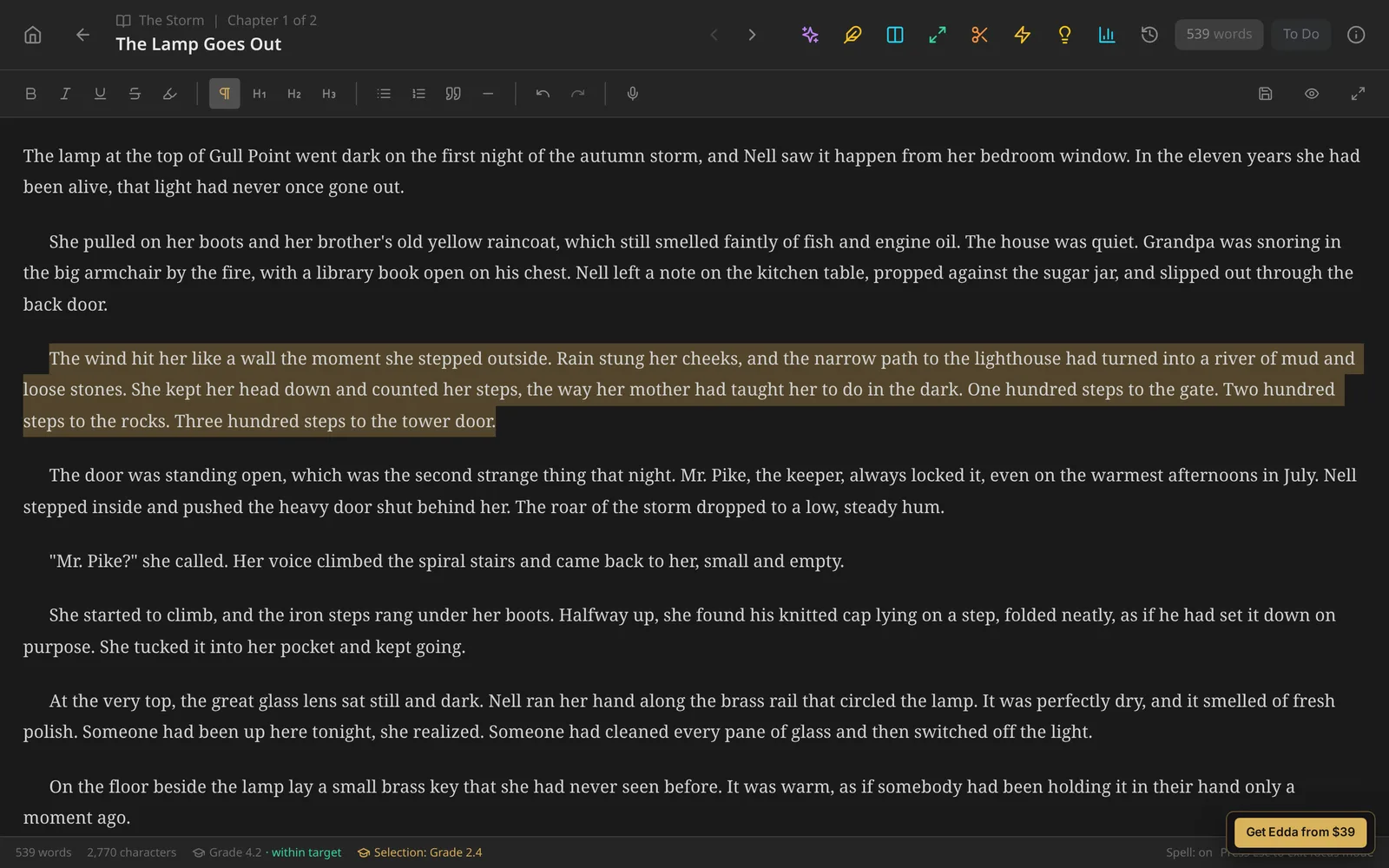
The same number follows your book everywhere:
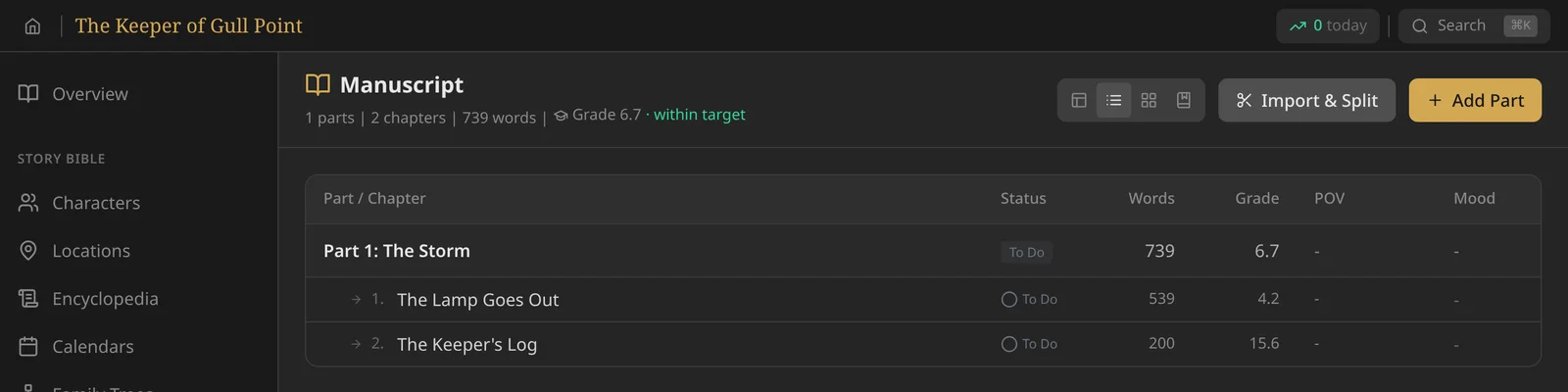
- Manuscript: the whole book in the header, every part and chapter, and a new Grade column in the outline.
- Corkboard cards, the split-screen chapter picker, and the preview when you split a chapter in two.
- Snapshots: each saved version, and both sides when you compare a snapshot with today's draft, so you can see what a revision did.
- Project overview, writing statistics, Export and Compile. Compile scores exactly the chapters you have chosen to include.
- Import and the manuscript splitter, so you know what you are bringing in.
Parts and whole books are scored from all their text together, not by averaging chapters, so a short chapter cannot skew the total.
Writing for young readers
Set a project to Picture Book, Early Reader, Chapter Book, Middle Grade or Young Adult and Edda compares your text with the usual grade range for that audience. Every readout says whether you are within, above or below the target. In the example above, a middle grade book reads at grade 6.7 overall, while one chapter written as an old keeper's diary reads at 15.6, which is exactly the kind of chapter worth a second look.
Treat it as a guide, not a rule. Picture books are read aloud, and lots of dialogue lowers the grade.
Three grade levels in the Skald
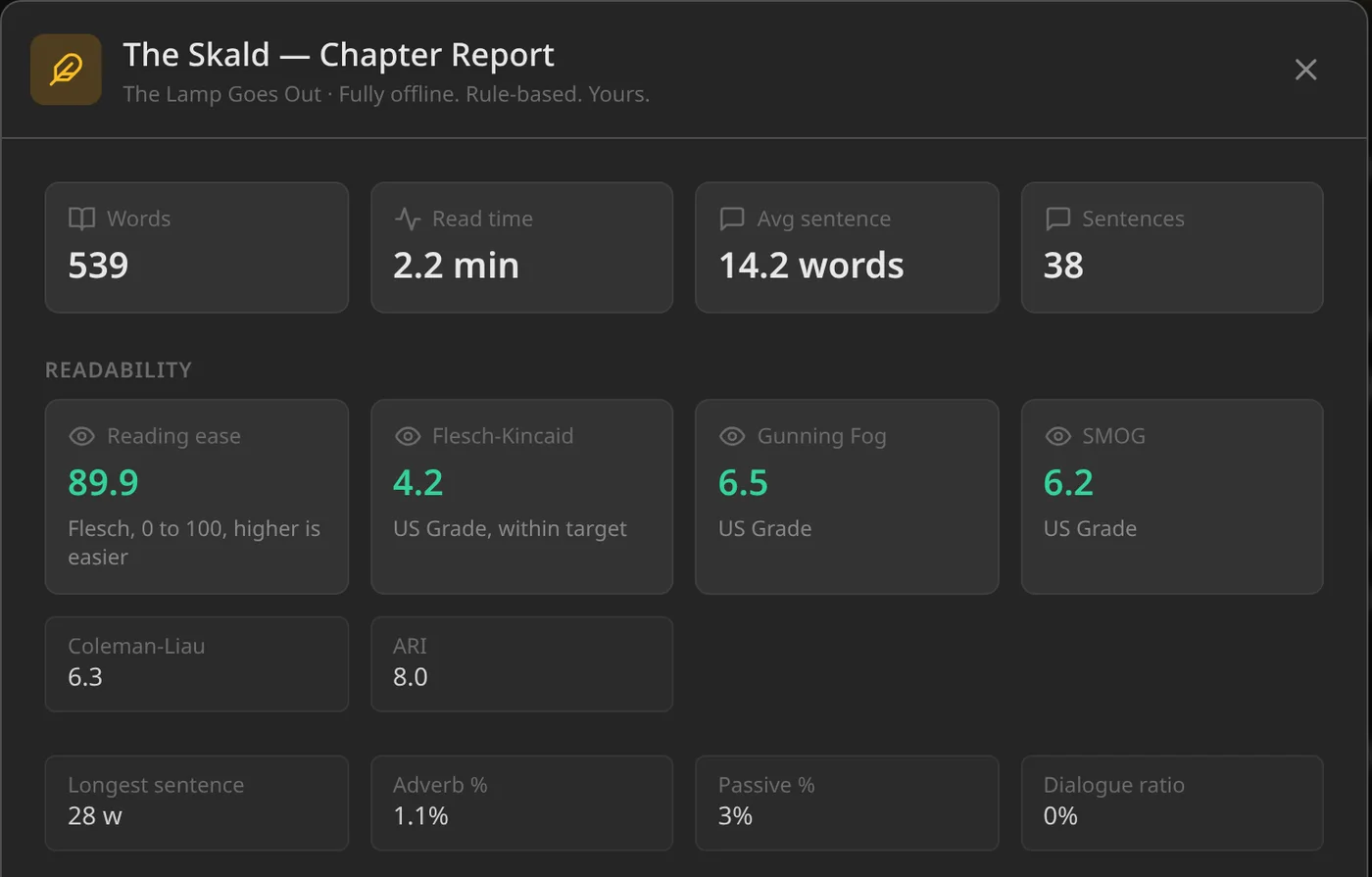
The Skald's chapter report now has a Readability panel with four scores side by side:
- Reading ease (Flesch): 0 to 100, higher is easier.
- Flesch-Kincaid: the grade level you see everywhere else in Edda.
- Gunning Fog: a grade level driven by long sentences and complex words. Names, hyphenated compounds of short words, and words that only get long through -es, -ed or -ing are not counted as complex.
- SMOG: a grade level based on words of three or more syllables, widely used for health and public writing. It needs at least 30 sentences to mean anything, so shorter chapters say so instead of showing a misleading number.
When the three grade levels agree, you can trust the reading. When they disagree, the reason is usually a handful of very long sentences or a run of long words, and the rest of the Skald report shows you where.
US grade, UK year or reading age
Not everyone thinks in US school grades. In Settings > Readability you can show every grade level as a US Grade (Grade 7.4), a UK school Year (Year 8.4) or a Reading Age (Age 12.4). The scores themselves do not change, only the label.
English only, on purpose
These formulas were built for English and do not work for other languages. Projects now have a language setting on their overview page. For anything other than English, Edda simply says that readability scores are available for English text only, rather than showing numbers that would mislead you. Screenplays, poems and song lyrics are not scored either, because the formulas assume prose sentences.
Like everything else in the Skald, it is all rule-based and runs offline on your computer. Nothing you write is sent anywhere, and the same text always gets the same score.
Also in 5.1
- During the free trial, the trial banner no longer covers the top of the window, so every toolbar button can be clicked.
- The Skald report now counts paragraph breaks correctly. It used to run paragraphs together, which made its sentence counts and scores too high on longer chapters.
- The Skald report now follows you when you move to another chapter with it open.
Getting 5.1
Edda 5.1 is available now for Windows, macOS (Apple Silicon) and Linux. It is a free update, and your installed copy will update itself. If you are on Windows and Edda has not updated itself in a while, download the installer once from the download page and run it; it updates in place and keeps your projects.
Want to try it first? The live demo runs 5.1, so you can paste in a chapter and see its reading level in your browser.
Know how your book reads
Reading level, Fog and SMOG, built into writing software you pay for once. No subscription, fully offline.
Get Edda from $39